
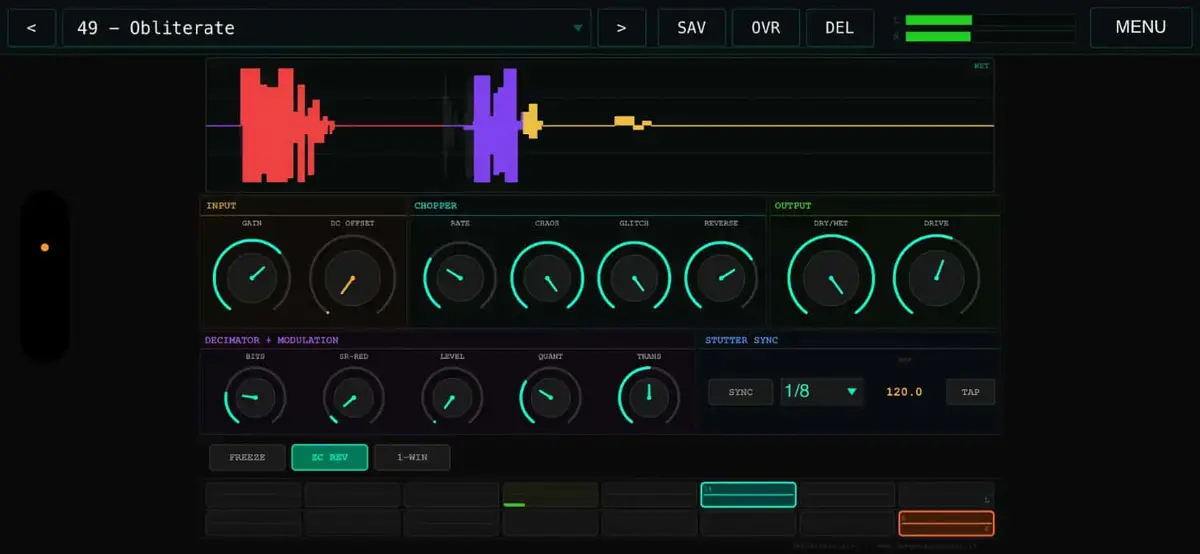
GlitchShredder is an audio effect application for iOS devices that processes incoming sound by chopping, repeating, and reversing fragments in real time.
Features
Chopper
This component handles independent left and right channel processing, offering 16 segment slots for each side to manipulate captured audio.
Glitch Probability
A control that determines the likelihood of glitch effects occurring, allowing users to adjust the rate at which segments are altered.
Stutter Sync
This feature aligns the stuttering effect with the host application's tempo or allows for manual BPM entry and tap tempo functionality.
Transient Snap
A tool with adjustable sensitivity that helps align audio segments to specific transient points within the signal.
Bit Crusher
A digital distortion effect that reduces bit depth and sample rate to create a lo-fi texture on the processed audio.
Processing capabilities
The application captures incoming audio fragments and manipulates them through repetition, reversal, and recombination. The Chopper engine manages these operations independently for the left and right channels, providing 16 segment slots per side. Users can control the behavior of these segments using probability-based settings for glitches and reversals, as well as quantized jumps that align changes to a beat grid. Transient detection assists in snapping segments to specific audio events, while per-segment RMS normalization helps maintain consistent levels across the chopped material.
Integration and control
GlitchShredder functions as a standalone app or as an AUv3 plugin within hosts such as GarageBand, AUM, Cubasis, and Logic Pro for iPad. It supports host-tempo synchronization via AudioPlayHead, with manual BPM and Tap Tempo available as fallback options. The interface includes a real-time oscilloscope for visualizing dry and wet signals, a 2x16 segment grid with waveform previews, and MIDI control for freeze functions and direct access to specific segment slots. Additional processing options include drive output saturation, bit crushing, and sample-rate reduction, all adjustable through a touch interface that supports pinch-to-zoom and fine parameter tuning.
Videos
Key facts
- $4.99 USD
- iPhone, iPad
- Standalone, AUv3
- 16 per channel