
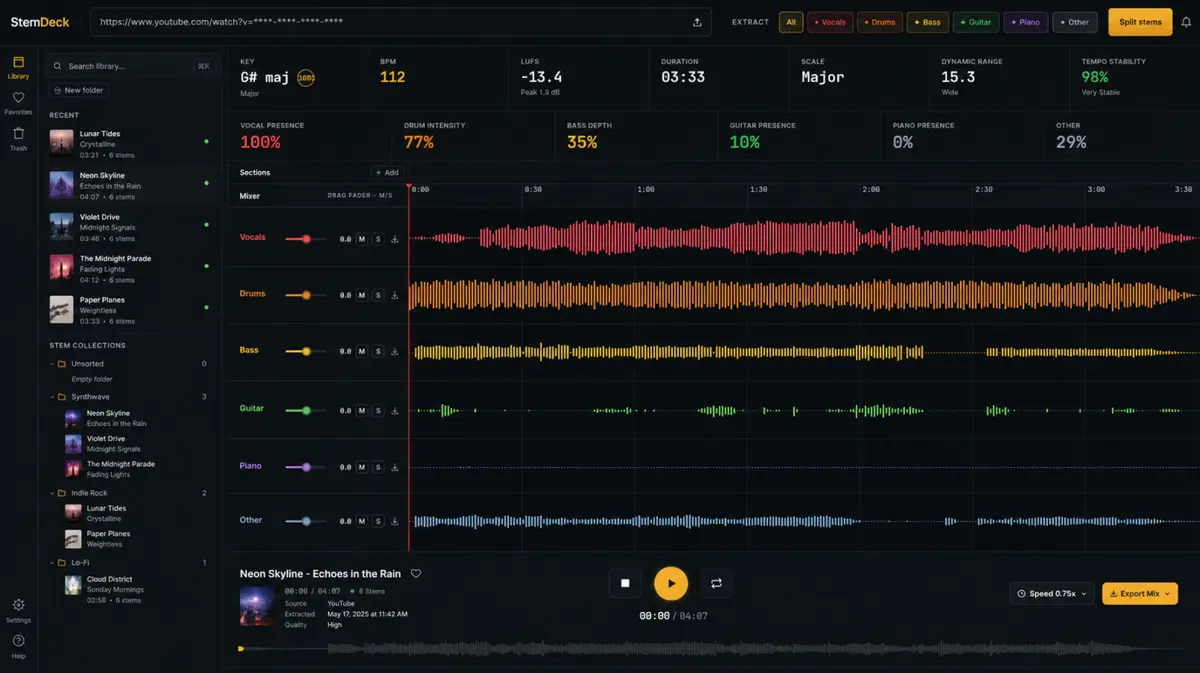
StemDeck is a free, open source application for separating audio tracks into individual stems on Linux, Mac, and Windows.
Features
Input
Users can load MP3, WAV, FLAC, OGG/Opus, MP4, or M4A files, or paste a YouTube URL to begin the separation process.
Stems
The software splits the audio into up to six categories: vocals, drums, bass, guitar, piano, and other.
Mixer
A DAW-style multitrack interface allows users to mute, solo, balance levels, zoom waveforms, loop regions, and export stems or custom mixes.
Local
All processing happens on the user's machine, with no accounts, quotas, uploads, or subscriptions required.
How it works
StemDeck processes audio files entirely on the user's computer. The application accepts a wide range of audio and video formats, including MP3, WAV, FLAC, OGG/Opus, MP4, and M4A. It also supports direct input from YouTube URLs. Once a file is loaded, the software separates the audio into up to six distinct stems: vocals, drums, bass, guitar, piano, and other.
The interface functions as a multitrack mixer, allowing users to control each stem individually. Users can mute or solo specific tracks, adjust balance levels, and zoom in on waveforms for detailed editing. The tool also includes a loop region feature and options to export individual stems or a custom mix of the separated elements.
Availability
StemDeck is available as a free download via GitHub. It runs on Linux, Mac, and Windows. The developer describes it as a local, free alternative to cloud-based services like Moises and LALAL.AI, emphasizing that no data is stored, cached, or redistributed. The developer notes that while StemDeck is suitable for personal study and local workflows, commercial products may be better for users needing mobile apps or deeper musician tooling.
Key facts
- Free
- Linux, Mac, Windows
- MP3, WAV, FLAC, OGG/Opus, MP4, M4A
- Vocals, Drums, Bass, Guitar, Piano, Other