
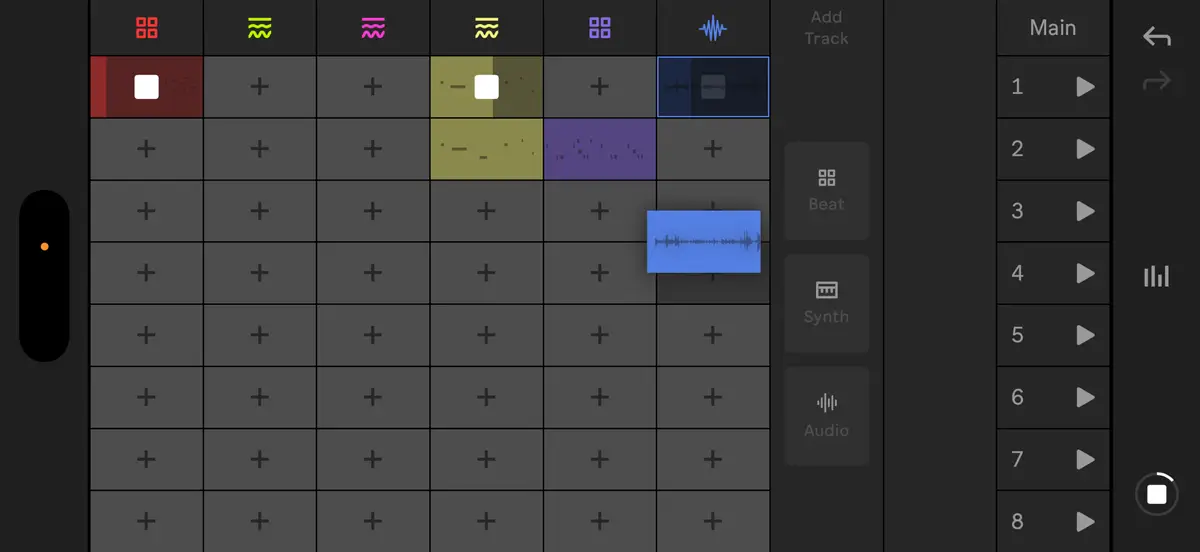
Ableton has released version 2.1 of Note, a mobile music creation app for iPad and iPhone that functions as a sketchpad for quick ideas.
Highlights
Landscape Mode
Session View and Audio Track View now operate in landscape orientation, allowing users to tilt the device to access controls more naturally.
Warp Markers
Audio Warp Markers appear in the clip editor above the waveform, and these markers transfer to Ableton Live on desktop.
Bounce MIDI Clips
Users can copy MIDI from a track and paste it into an Audio Track to create a clip that can be saved to the User Library.
Time Signatures
The app now includes options for arbitrary time signatures, expanding rhythmic possibilities beyond standard meters.
Loop Controls
Bars can be tapped directly to set loops, removing the need to navigate through context menus for this action.
Piano Roll
The piano roll interface is now playable, allowing direct interaction with notes during composition.
Interface and workflow changes
Note 2.1 introduces landscape support for Session View and Audio Track View, which the article describes as a significant usability improvement over the previous portrait-only layout. This change allows for a more natural interaction when tilting the device to access controls. The update also refines the user interface with improved visual feedback, better labels, and more intuitive interactions. Tapping bars directly to set loops is now possible without using context menus, and the piano roll has become playable, adding a new layer of interaction to the composition process.
Audio and MIDI capabilities
The update adds Audio Warp Markers to the clip editor, positioned above the waveform. These markers are preserved when projects are transferred to Ableton Live on desktop, facilitating a seamless workflow between mobile and desktop environments. A new feature allows users to bounce MIDI Clips by copying data from a MIDI Track and pasting it into an Audio Track. This process creates a clip that can be saved to the User Library, enabling better integration with other iOS applications. The article notes that this capability makes the app more versatile for sketching grooves and sharing them with other tools.
Availability and additional content
Note 2.1 is available on the App Store for iPad and iPhone. The update includes new presets and samples from Sudan Archives and BADSISTA, which the article describes as a source of inspiration distinct from standard drum machine sounds. The release also features support for arbitrary time signatures, allowing for more complex rhythmic structures. The article suggests that these refinements and engine improvements may lay the groundwork for future enhancements, such as better integration with other iOS tools and Ableton Move.
Key facts
- iPad, iPhone
- 2.1
- Ableton